
Behringer X32 Full
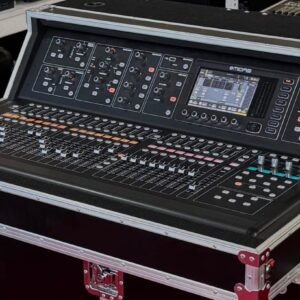
Behringer X32 Full console
Behringer X32 Full identifies the full-size X32 digital mixing console in this stock list. The manufacturer’s X32 model has thirty-two Midas-designed microphone preamps, twenty-five motorised faders, channel LCD displays and a seven-inch colour screen. Its physical control surface is the main distinction from the rack and smaller X32 formats.
Local mixing workflow
Motorised faders recall their saved positions when a scene is loaded. The channel displays provide names and colour identification so that the operator can follow the active input or bus layer. Eight DCA groups and six mute groups offer control of a busy input list without changing every channel individually.
Monitor and zone routing
The X32’s sixteen mix buses and six matrices provide paths for monitors and distributed outputs. This lets the same console handle a main mix and additional feeds, with routing selected for the production. A useful setup starts with a patch list and output plan; the physical socket count and processed mix-channel count are different aspects of the console.
Effects and digital connections
Eight stereo effects engines form a virtual processing rack. The console also provides AES50 connections for digital I/O and ULTRANET for personal-monitoring distribution. Those connection facilities allow system expansion, but do not imply that any external stagebox, personal mixer or network cable is supplied with this used console.
Recall and recording
The manufacturer documents storage of up to one hundred scenes, including preamp settings. USB computer recording and playback can carry up to thirty-two channels in each direction, while the front USB port supports a board-mix recording workflow. The installed expansion card and computer configuration should be identified before specifying the exact recording arrangement.
The offered model
The inventory title X32 Full is retained to distinguish this unit from X32 Rack, Compact and Producer. It refers to one console in excellent condition at the displayed price. A case, computer, software licence, digital stagebox or other component is not added to the named product contents.
Follow the signal through the console
A practical X32 show plan separates the input socket, its assigned channel, the channel’s processing, the selected mix bus and the final physical output. The screen’s routing choices join those parts together. A cable plugged into one local input does not force the same numbered channel to remain its destination in every show file. Keeping a patch list beside the console makes this flexibility manageable. For each source, note its real entry point and the name used on the fader display. Then record the output destination. The result is a map another engineer can follow, rather than a collection of settings that only its creator understands.
Make layered faders easy to read
The full-size surface gives direct access to more faders than a rack interface, but each fader can still represent different channels or buses according to the selected layer. The programmable channel names and colours are therefore useful working information. Group related inputs consistently and use names that explain the source, especially when several microphones have similar roles. A label such as a performer or instrument name is usually more useful during a changeover than an unexplained channel number. Before moving a fader in a busy show, check which bank and operating mode are active. A physical fader provides fast control when its current assignment is clear.
Distinguish DCA control from audio submixing
A DCA group provides collective level control of assigned channels. A mix bus creates an audio feed that can be processed and routed onward. The choice depends on the job. If the aim is to bring several input levels up or down together while retaining their individual routing, a DCA can provide a convenient control point. If the aim is to send an actual combined audio signal to another destination, that calls for a bus or other appropriate route. Treating these as separate tools helps keep a large input list understandable. A group label should explain what the operator expects that control to change.
Build monitor mixes with Sends on Faders
The X32’s Sends on Faders workflow lets the surface control the levels feeding a selected mix bus. This is useful for balancing a performer’s monitor without repeatedly opening every channel’s send page. The important operating step is to identify the destination bus and confirm the surface mode before adjusting levels. After the request is addressed, return to the intended main-mix view. For an illustrative band setup, a singer’s monitor can emphasise vocal and timing references while the audience mix keeps a different balance. That example explains the bus function; it does not specify a supplied monitor system or a preset already loaded on this console.
Choose send positions around the result
Pre-fader and post-fader sends establish how a destination responds when a main channel fader moves. A performer’s monitor often needs to remain steady while the audience balance changes; an effects send may need to follow that change. Processing and mute behaviour also deserve attention in a detailed show plan. Decide what should happen at the destination, then inspect the corresponding routing and send settings. A useful soundcheck deliberately changes a channel level and confirms the response at the intended output. This makes the relationship audible, rather than leaving it as a label in a menu that the operator assumes is correct.
Give effects an intentional place in the mix
The internal effects engines can serve as shared effects or processing inserted into a signal path, depending on the selected slot and configuration. Shared reverb, for example, requires an intentional feed and an intentional return to the mix. The return level is part of the balance, not a substitute for deciding how much of each source reaches the effect. Label those routes so they remain obvious during scene changes. Start with a clear dry signal, then add the effect while listening in the full mix. An available algorithm is a tool; it does not establish that a stored setting suits every voice, room or musical arrangement.
Use matrices to organise output destinations
The console’s matrices are useful when an existing mix needs another output path with its own level or processing. A main PA feed, a different room and a production feed may need distinct treatment even when they share much of the same source balance. Identify the mix feeding each matrix and the physical connector carrying the result. Check the destination equipment’s expected signal level separately. A matrix can help organise these requirements without forcing the engineer to rebuild every zone directly from all input channels. Its value comes from a clear routing design, rather than simply using every available output because it is present.
Separate source capture from the live balance
A multitrack recording can preserve sources for later work, while a stereo board recording preserves the selected programme mix. The appropriate choice depends on what needs to be delivered after the event. For multitrack work, confirm the installed card and route the desired channels to the computer in a documented order. For a stereo recording, verify which mix and tap point are feeding the recorder. A short record-and-playback check can reveal missing channels or an unintended route before the show begins. These facilities describe how an X32 can be configured; a computer, recording application and storage media are separate parts of a recording setup.
Manage scene recall around the current patch
A stored scene can restore a large amount of console state, including preamp settings. That makes it useful for returning productions, but also makes verification important when the physical system has changed. Check the input list, phantom-power requirements, output patch and routing before using the recalled mix at performance level. Give saved versions meaningful names and retain a clear working copy of the current show. The motorised faders make recalled positions visible, but a fader position alone cannot confirm the route behind it. The useful question is whether the saved state matches the sources, destinations and operating requirements of this event.
Plan shared digital I/O and local control
The X32 provides AES50 audio networking and Ethernet editing facilities, which serve different purposes. A stage-end I/O device can move microphone connections nearer the performers, while editing software can move the control point. The network audio path, the control path and the operator’s fallback access should be considered separately. For a production sharing preamps, the relationship between head-amp gain and local digital trim also matters: a change at a shared input stage can affect more than one mix. Establish who controls that stage before the show. This is a system-design consideration, not a claim that an external stagebox or second console is included.
Match the console to the working position
The full X32 is most attractive when its physical faders, selected-channel controls and display can be used where the engineer needs them. Consider sightlines to the stage, access during a changeover and enough working space for a patch list or playback controls. The practical benefit of the surface is immediate access to a clearly organised mix. Its value is different from the compactness of an X32 Rack, even though both share the family’s digital-mixing approach. Select the format around the event and operator, then confirm the actual installed interface card and required connections. The supplied X32 Full name identifies this full-size console rather than a compact variant.
Condition, availability and price
Behringer X32 Full is offered in Excellent condition. Available stock: 1. Unit price: €700. The quantity is the available stock count and the price applies to one listed unit.

There are no reviews yet. Be the first one to write one.