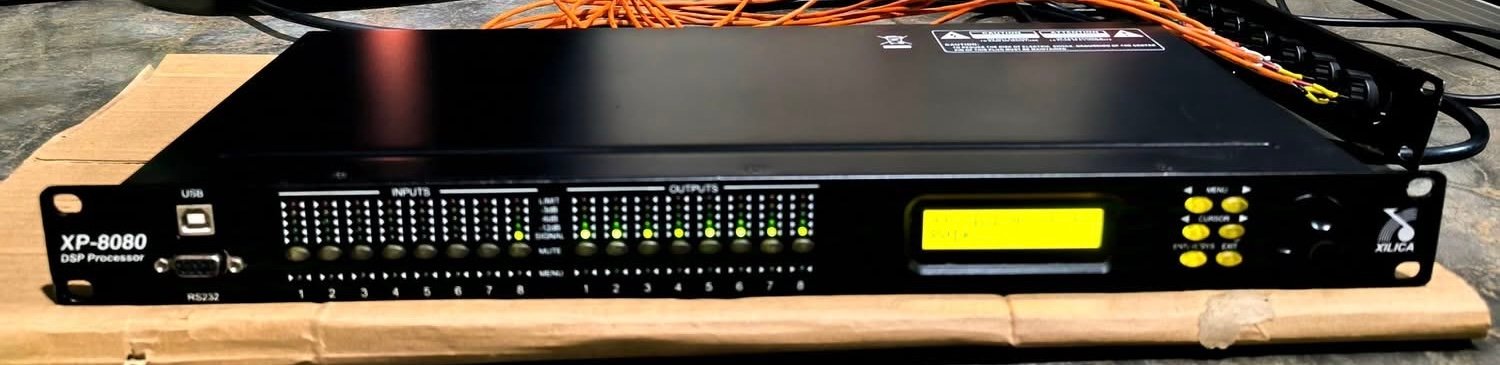
Xilica XP 8080 digital signal processor
The Xilica XP 8080 is an eight-input, eight-output digital signal processor from Xilica’s fixed-architecture XP Series. This listing offers the Xilica XP 8080 in Excellent condition at €400 per unit, with 2 units available. Each unit is offered individually; the available stock count is not a package quantity.
Eight channels in and eight channels out
The XP 8080 provides eight balanced analogue line inputs and eight balanced analogue line outputs. Its channel count makes it a useful candidate when a system requires several separately processed signal paths. The XP Series documentation describes a fixed processing architecture, so planning starts with the available inputs, outputs and processing functions rather than building an arbitrary DSP design from individual blocks.
The rear-panel audio connections on the XP 8080 use Euro/Phoenix terminal blocks. This is an important model detail: the XP 8080 should not be confused with smaller XP models that use rear-panel XLR connectors. The manufacturer’s diagrams identify the input and output banks individually, allowing a system designer to plan wiring and channel allocation before installation.
Processing and adjustment
Xilica specifies 96kHz sampling, a 40-bit floating-point DSP and 24-bit analogue conversion for this series. The user manual documents channel gain, polarity, delay, equalisation, crossover filtering, input compression and output limiting. These functions allow the processor to perform the separate tasks involved in routing and shaping a sound system: setting levels, adjusting timing, dividing frequency bands and controlling signal peaks.
The different processing stages have different purposes. Delay is a timing adjustment, while equalisation changes the frequency balance of a signal. Crossover filters define the operating bands assigned to outputs. Compressor and limiter settings should be chosen for the actual connected system rather than copied without checking the design requirements. The official manual is the appropriate reference for parameter ranges and the order of operations.
Front-panel access and computer control
The front panel brings together input and output metering, mute/channel selection, a backlit display, menu navigation and a rotary control. The supplied photograph clearly shows the XP-8080 model marking and the separate input/output meter sections. These visible features provide a practical view of the actual processor being offered.
For configuration, the documented connections include front-panel USB, RS232 and rear-panel Ethernet. Xilica’s manual explains XConsole installation, connection troubleshooting and the front-panel menu structure. Buyers planning to incorporate an XP 8080 into an established system should consult that documentation for the required control arrangement and programming workflow.
Manufacturer reference
Read the official Xilica XP Series user manual and official XP Series specification sheet for detailed technical information. Explore the Bsound Pro Audio processors category for other signal-processing equipment.
Building an eight-by-eight signal plan
An eight-input, eight-output processor provides a particularly clear way to organise a system that has several source feeds and several destinations. Before programming the Xilica XP 8080, make a list of the signals that need to enter the rack. Distinguish programme feeds from other audio sources, then list the destinations that need independent processing. This establishes whether the available channel count suits the application without making assumptions about how many loudspeakers can be driven by the rest of the system.
For example, the planning question may be whether a destination needs its own level, equalisation or timing adjustment. Two physical destinations that need different processing should be considered separately in the signal plan, even when they ultimately carry similar programme material. Conversely, duplicating a source name in a drawing does not by itself mean that another physical input is required. Thinking through the actual signal paths is more useful than allocating channels only because sockets are available.
The XP 8080 is a line-level processor. Its place in that plan is the audio-processing stage between the source equipment and the next appropriate stage in the system. Its output channels do not replace the power-amplifier channels needed by passive loudspeakers. Keeping line-level routing and loudspeaker-level distribution separate in the system drawing helps avoid a misleading picture of what eight outputs represent.
Working with fixed-architecture processing
Fixed architecture gives the operator a defined collection of processing stages rather than an empty design canvas. That can be useful where the practical task is to configure a repeatable rack or reproduce a known system arrangement. The engineer still decides what each channel is for, what it receives and how its parameters should be set. The hardware architecture does not decide the appropriate settings for a particular loudspeaker, room or programme source.
A useful programming method is to begin with the routing and channel names, then work through the relevant processing stages in a consistent order. Verify the intended input-to-output relationships before making tonal adjustments. This keeps a routing mistake from being obscured by equalisation or a level change elsewhere in the signal chain. It also gives the next engineer a clearer starting point when the system needs to be checked.
For the XP 8080, the individual input and output meter sections are helpful because the two sides of that plan can be considered separately. An input indication answers a different question from an output indication. Signal may be reaching a processor without being sent to the intended destination, or an output may be active while the downstream equipment has a separate issue. Metering is a way to narrow the question, not a guarantee that the entire sound system is configured correctly.
Level, timing and frequency balance
Gain, delay and equalisation should be treated as separate decisions. Gain establishes the relative level at a point in the signal path. Delay changes when a signal arrives. Equalisation changes its frequency balance. The XP 8080 brings these functions into the same processor, but their physical purposes remain different. Knowing which problem is being addressed makes an adjustment easier to explain and to revisit.
For a distributed sound system, an engineer may need to consider the timing relationship between destinations as well as their relative levels. For a system divided into frequency bands, crossover choices need to follow the loudspeaker design and the appropriate engineering requirements. Neither application can be solved merely by selecting a processor preset without understanding what the outputs are intended to do.
Compression and limiting also have different roles from ordinary channel gain. They respond to signal level according to the selected parameters. Appropriate thresholds and time behaviour depend on the system and the intended result. A controller being sold in Excellent condition does not imply that the parameters presently stored in its memory have been chosen for a buyer’s application; the configuration should be reviewed as part of integration.
Terminal-block connections and control access
The XP 8080’s terminal-block audio connection format deserves attention when planning the physical rack. It differs from plugging an XLR cable into a processor that already has XLR audio sockets. The engineer should review the actual rear-panel connector arrangement, the required cable termination and the manufacturer’s pin references. The aim is a documented connection plan in which every input and output can be traced to its destination.
Control connections should be considered separately from audio connections. Ethernet, USB and RS232 are identified as configuration/control routes in the XP documentation. The presence of an Ethernet socket alone should never be taken as proof that an older DSP product carries a particular network-audio format. Match the intended control method to the manufacturer’s software and connection instructions instead of selecting it by connector appearance.
Keeping a processor configuration useful over time
When a processor serves more than one layout, configuration records become especially valuable. A meaningful channel name, a routing drawing and a dated configuration record explain what a setup is intended to accomplish. That context is more durable than a preset name that only made sense to the engineer who first created it. Keep the audio design, the processor settings and the physical rack labels consistent with one another.
For a buyer with an established XP 8080 system, those records also make comparison easier. The relevant questions include whether the required input and output count is available, whether the control workflow suits the existing rack and whether the terminal-block connection format fits the installation plan. The official manual supplies the device-specific reference; the intended system determines how those capabilities are used.
Linked adjustments and clear channel relationships
The XP manual describes linking selected channels, with input and output selections treated separately. This is useful to understand where a configuration contains related signal paths. A linked change should be intentional: channels may share an adjustment because they perform the same role, while other channels need to remain independent because they serve different destinations.
Before using a linked adjustment, identify which parameters and channels should move together. Keep that relationship in the configuration record so that another engineer understands why a control affects more than one path. This is particularly helpful in an eight-by-eight processor, where several channels can look similar in a software view while performing different jobs in the actual system.
The same clarity applies to the display of timing information. A delay setting represents a time relationship, even when the interface presents an equivalent distance. Use consistent units and retain the physical reason for the adjustment. That makes the setting understandable when the processor is moved between layouts or a cabinet position changes.
There are no reviews yet. Be the first one to write one.